Connection on PSMN servers
Important
It is mandatory to use authentication via private/public key pair [1] to connect to a PSMN server. See Using SSH keys and SSH agent.
To work on PSMN cluster, you need firstly to connect to allo-psmn, which allows to connect to one of PSMN front-end servers (login nodes). The connection to allo-psmn is working directly from ENS network, or via a gateway server from outside of ENS network (either ssh.psmn.ens-lyon.fr or ssh.ens-lyon.fr):
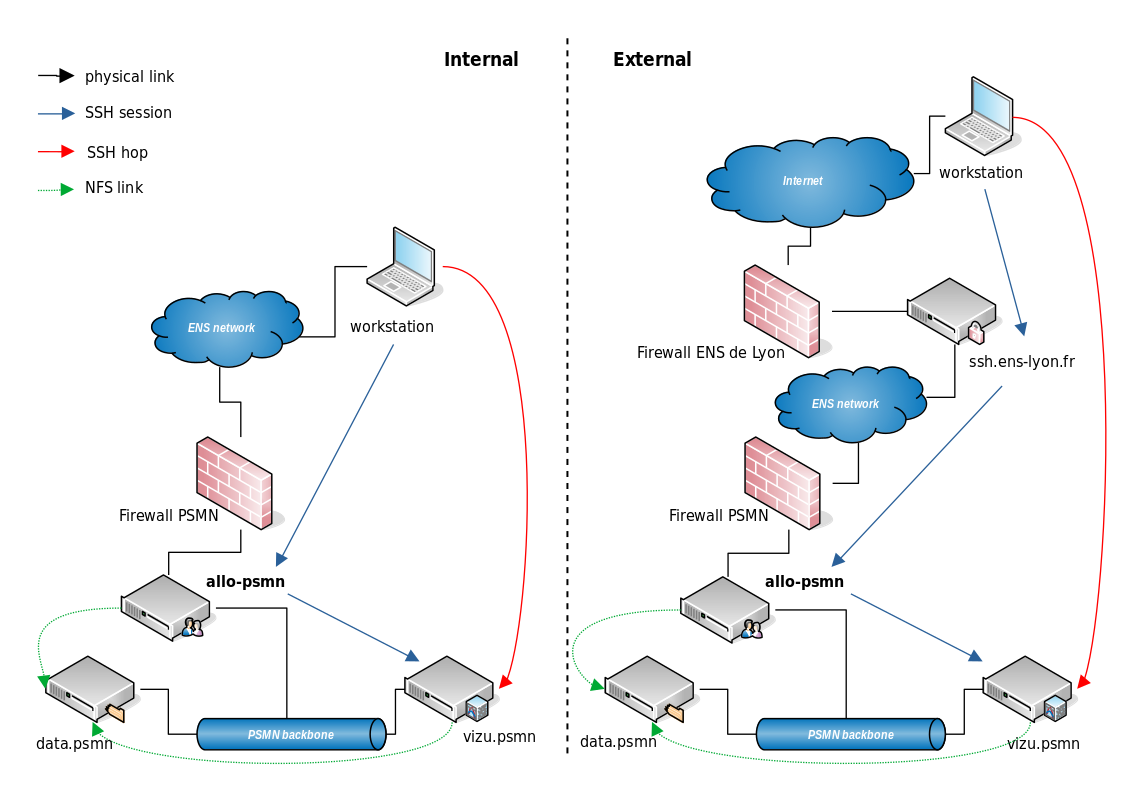
Fig. 3 Internal or External PSMN gateways synoptic
Warning
allo-psmn is a connection server, it only allows you to access and to transfer your files and that’s all.
Its only purpose is to connect to the PSMN’s network to access front machines. To work on PSMN cluster, you need to connect from allo-psmn to one of the front-end servers (login nodes).
From ENS network
To connect to PSMN clusters, you need to use SSH. The easiest way is to use the following command:
From a Linux or a MacOS X computer, open a terminal and type:
ssh -A mylogin@allo-psmn.psmn.ens-lyon.fr
replace mylogin by your login (as provided by PSMN).
From a Windows computer, refer to OpenSSH activation for Windows 10.
From outside ENS network
In order to connect on allo-psmn from outside ENS network, you must use one of the external SSH gateways:
ssh.psmn.ens-lyon.fror
ssh.ens-lyon.fr, if you have an user account at ENS de Lyon,Warning
ssh.psmnandssh.ensare connection servers (or gateways). There is no home space on it (~5MiB max). Your real PSMN home starts atallo-psmn.
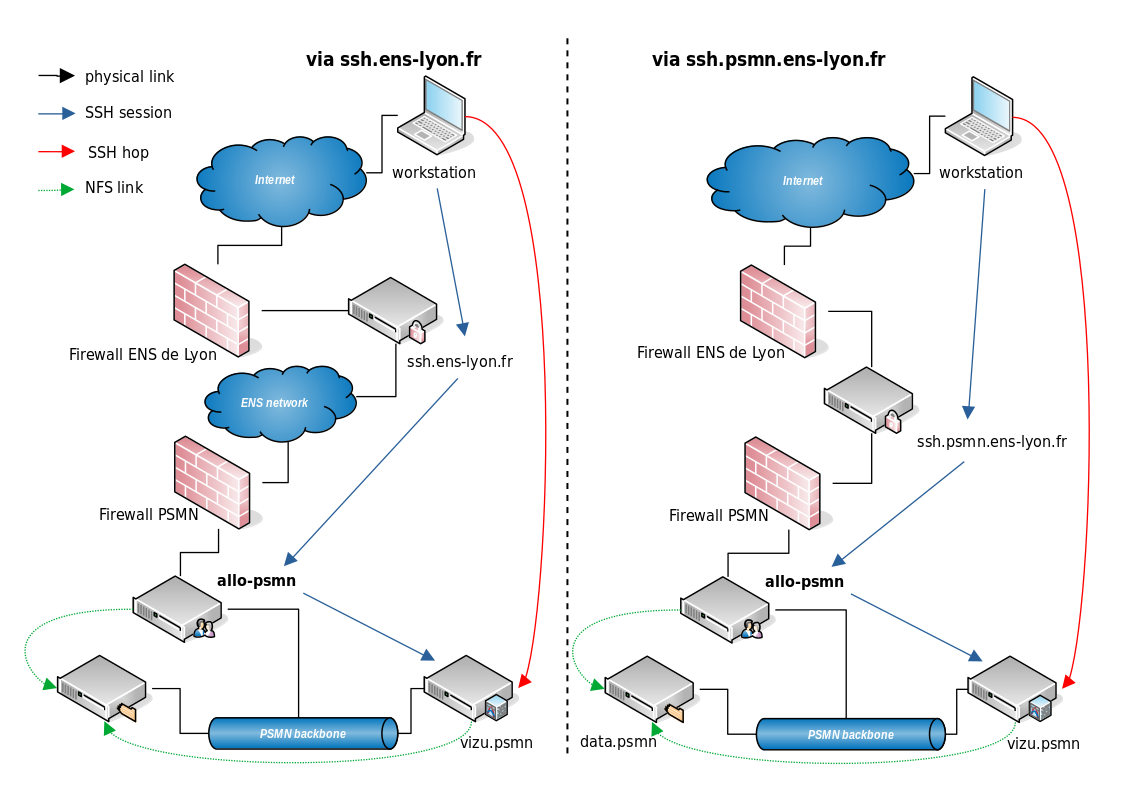
Fig. 4 PSMN gateways synoptic (ssh.ens or ssh.psmn)
Therefore, in order to connect on allo-psmn from outside ENS network, first you need to connect to the external SSH gateway ssh.psmn.ens-lyon.fr, then you can connect to allo-psmn:
# add -A, or configure your ssh client to "ForwardAgent yes"
#
ssh -A mylogin@ssh.psmn.ens-lyon.fr
# then, once connected:
ssh -A mylogin@allo-psmn.psmn.ens-lyon.fr
Warning
Banned IP?
As ssh.psmn.ens-lyon.fr is a known SSH gateway for a (very) long time, it is very exposed to attacks. So our layered protections are very sensitive and easy to trigger.
You will be banned on your first error. Open a ticket, with explanations, to unban your account.
One-step connection:
ssh -AX -oProxyCommand="ssh mylogin@ssh.psmn.ens-lyon.fr netcat -w1 allo-psmn %p" mylogin@allo-psmn.psmn.ens-lyon.fr
Warning
allo-psmn is a connection server, it only allows you to access and to transfer your files and that’s all.
Its only purpose is to connect to the PSMN’s network to access front machines. To work on PSMN cluster, you need to connect from allo-psmn to one of the front-end servers (login nodes).