First connection
At your first attempt to connect to PSMN (either from the ENS network or from outside, see figure below), you (may) have to accept our SSH HostKey :
The following message will appear at your first attempt to connect by SSH to allo-psmn (or ssh.psmn, then allo-psmn):
The authenticity of host allo-psmn.ens-lyon.fr (140.77.144.90) can not be established.
RSA key fingerprint is xx:lots:of:caracters:ascii:xx:xx.
To the question:
Are you sure you want to continue connecting (yes/no)?
answer :
yes
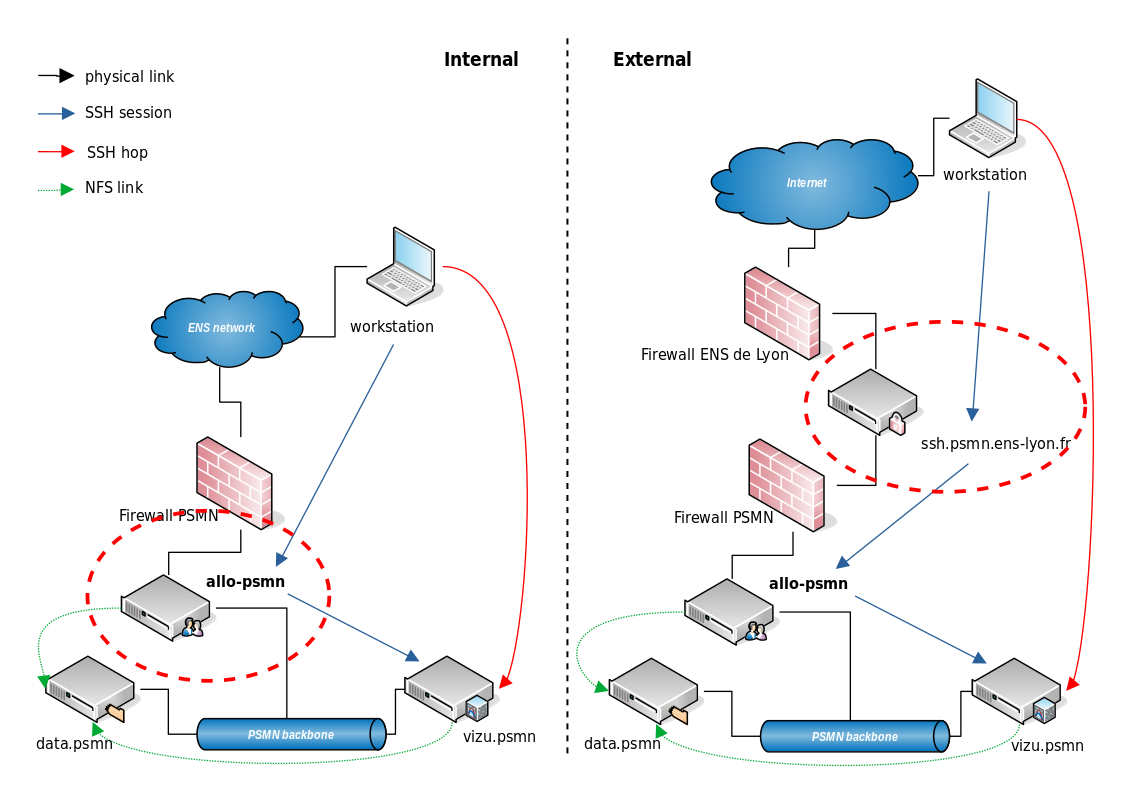
Fig. 2 Internal or External PSMN gateways synoptic
Warning
Banned IP?
As ssh.psmn.ens-lyon.fr is a known SSH gateway for a (very) long time, it is very exposed to attacks. So our layered protections are very sensitive and easy to trigger.
You will be banned on your first error. Open a ticket, with explanations, to unban your account.
Define an minimal working environment
See our Environment & tools chapters.
Define minimal ssh configuration
To automate as much as possible connections to machines and compute nodes, create the following configuration file (~/.ssh/config) on your client workstation:
Host *
  ServerAliveInterval 60
  ForwardX11Timeout 1d
  TCPKeepAlive yes
  ForwardAgent yes
  ForwardX11 yes         # for Linux
#  ForwardX11Trusted yes # for MacOSX
  Compression yes
  StrictHostKeyChecking no
  HashKnownHosts no
You can find a more complete file in the chapter Example of SSH configuration.
vi/vim configuration file
See our vim chapter in editors page.